How to keep every driver conversation on one DSP number.
Five steps that put every text and call with a driver on the DSP number, clear what came in before the first wave, and leave a record the next shift can read.
By Daniel Yadav · Published 13 September 2026
Why driver conversations get lost
At most DSPs, a driver conversation lives on whichever phone picked it up. Nobody else can see it, and the next shift starts blind. Four gaps cause it:
- Drivers text managers' personal phones, or another app.
- Dispatch keeps switching between portals and phones.
- You call a driver without seeing their route or score.
- The next shift has no idea what the last shift told a driver.
What good looks like
- Every text and call with a driver goes through the DSP number.
- Unread messages and missed calls are cleared before the first wave.
- Nobody calls a driver without reading their route and score first.
- Every call is made from the dialer, so it lands on the driver's timeline.
- The next shift finds a note wherever something is still open.
The procedure
Five steps: two every day, two on every call and one at every shift change. Texts and calls leave from the station line, and everything lands on the driver's timeline in Inbox.
-
1
Text every driver from the DSP number, never a personal phone
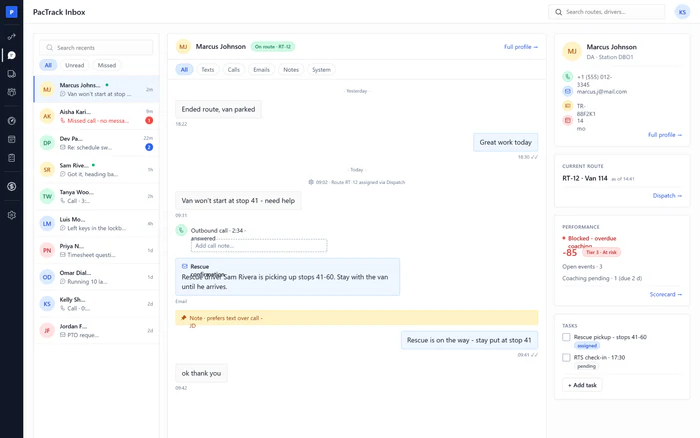
Every dayWhere InboxWho Dispatcher or ManagerSend every text to a driver from Inbox, where it leaves from the DSP's SMS line. It is the same number your automatic dispatch and compliance texts use, so drivers see one number for everything, and their replies come back to the same timeline.
Done when: The text shows on the driver's timeline with its delivery receipt, and no text went from a personal phone.
-
2
Clear unread messages and missed calls before the first wave
Every morningWhere InboxWho Dispatcher or ManagerBefore the first wave loads, filter Recents to Unread and answer every row, then filter to Missed and call every driver back. Opening a row marks it handled for the whole team, so work each one to the end.
Done when: Unread shows that you are caught up, and Missed shows no missed calls or voicemails.
-
3
Check the driver's route and score before you call
Every callWhere InboxWho Dispatcher or ManagerBefore you call a driver, open them in Inbox and read the right-hand rail: whether they are on route, which route and van as of what time, whether they are clear to work, and their score and open coaching. Then call knowing what you are calling about.
Done when: You read the route, the van, the shift gate and the score before you dialed.
-
4
Call from the dialer so the call lands on their timeline
Every callWhere DialerWho Dispatcher or ManagerMake every call to a driver from the dialer: the phone button at the bottom right of every page, or the Call buttons on Inbox, Associates, Load Out, On Road and Compliance. The call shows the DSP number, and when you hang up it lands on the driver's timeline with its length, its outcome and who made it.
Done when: The call shows on the driver's timeline, with a note if anything was agreed.
-
5
Leave a note on the timeline when the shift changes hands
Shift changeWhere InboxWho Dispatcher or ManagerBefore you hand over, open each driver with something still open and leave an internal note on their timeline, or add a task. Drivers never see notes. Inbox has no station-wide handover list, so also tell the next shift which drivers you left notes on.
Done when: Every open item has a note or a task on the driver's timeline, and the next shift knows which drivers to open.
The three numbers to watch
Common mistakes
- Texting drivers from a personal phone.
- Leaving missed calls until after load-out.
- Calling without reading the rail.
- Calling from your own phone.
- Opening a message you cannot deal with yet.
- Handing over from memory.