How to catch lost packages, the same night.
Five steps that check, every night, that the packages that should come back did come back: the route math, the door count and Amazon's returned count side by side, and a reason for every gap.
By Daniel Yadav · Published 13 September 2026
Why lost packages are found a week later
A package that goes out and is neither delivered nor brought back is a lost package. Most DSPs only learn about it when it turns up on the Scorecard or as a customer concession. Four gaps let it slip:
- Nobody checks that the undelivered packages actually came back.
- Returns are counted by hand, if at all, and never compared with Amazon's files.
- A lost package shows up a week later, on the Scorecard.
- Nobody knows how many packages went missing today.
What good looks like
- Every route shows how many packages should come back, from Amazon's own routes file.
- Every van's returns are counted at the door before they go to Amazon.
- The door count and Amazon's returned count sit side by side, and every gap has a reason.
- Missing packages are known, and raised with the station, the same night.
- Drivers who keep coming back short are coached every week.
The procedure
Five steps: four at Return to Station every night and one every week. The whole check is simple: did every package that needed to come back, come back?
-
1
Check that every route brought back what it should
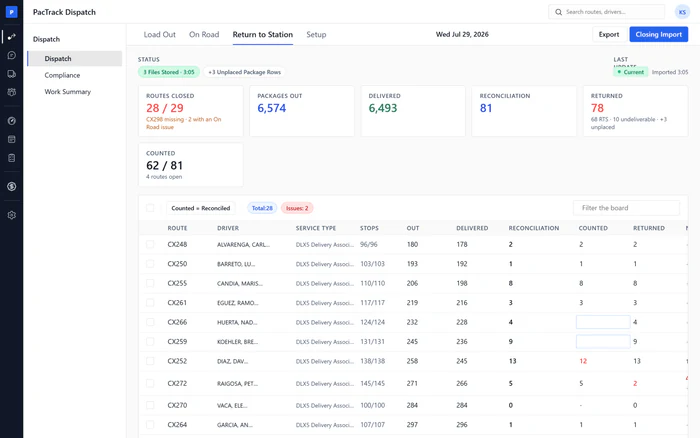
Every nightWhere Dispatch · Return to StationWho DispatcherRun the closing import with Amazon's routes and packages files. Every route gets three numbers: Reconciliation, what should come back; Returned, what Amazon's package file says came back; and Counted, what you count at the door. Read the tiles first, then the board route by route.
Done when: The day's files are stored, Routes Closed matches Load Out, and Returned equals Reconciliation or every difference is explained.
-
2
Count each van's returns before they go to Amazon
Every nightWhere Dispatch · Return to StationWho DispatcherAs each van comes back, count its undelivered packages before they are handed to Amazon's staff, and type the number in the route's Counted cell. A count that does not match the route's reconciliation turns red on the spot, whether it is short or extra.
Done when: The Counted tile shows the same number on both sides, and no Counted cell is red or empty.
-
3
Get the reason for every short route from the driver
Every nightWhere Dispatch · Return to StationWho DispatcherFor every red Counted cell, talk to the driver at the van or call them. Find out what happened to each missing package, and write the reason in the route's note. A package marked missing that turns up on the van goes back out for another attempt.
Done when: Every short route carries a note naming the reason.
-
4
Tell the station about missing packages the same night
Every nightWhere Dispatch · Return to StationWho Dispatcher or ManagerRead Missing Packages on the EOS report, export the report, and tell Amazon's station staff about every missing package when the returns are handed over. Ultimate DSP sends nothing to Amazon, so the conversation, and a record of it, are yours. Then close the day.
Done when: The EOS report is exported, station staff were told, and the day reads Closed with who closed it and when.
-
5
Coach drivers who keep coming back short
WeeklyWhere Scorecard · EventsWho ManagerOnce a week, look back over the closed days and their notes for drivers who came back short more than once. Log a manual event against your standard for each repeat, with what was seen, and assign coaching. The driver is told, and overdue coaching keeps them off the schedule.
Done when: Every driver who came back short more than once this week has an event and coaching assigned.
The three numbers to watch
Common mistakes
- Using Counted = Reconciled without counting.
- Letting drivers hand returns to Amazon before counting.
- Writing short without a reason.
- Assuming Ultimate DSP tells Amazon.
- Closing the day with routes still uncounted.
- Coaching a driver for a station mistake.